Referral System Management
1. Overview Tab
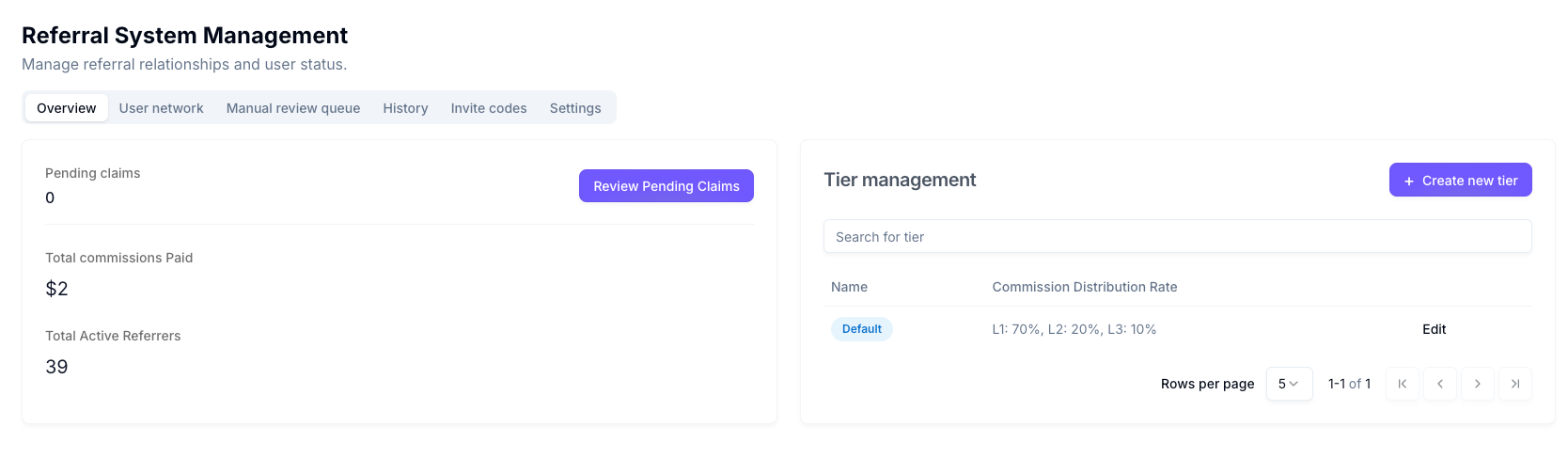
Overview statistics
| Step | Action | Details |
|---|---|---|
| 1 | Access Referral Management | Navigate to Referrals in the main menu, then to Manage. |
| 2 | View Overview tab | Overview is selected by default. |
| 3 | Review Pending claims | Card shows the number of commission claims awaiting review (e.g. "0"). |
| 4 | Review Total commissions Paid | Card shows cumulative amount paid to referrers (e.g. "$0"). |
| 5 | Review Total Active Referrers | Card shows count of users currently earning referral commissions. |
| 6 | Review Pending Claims action | Click Review Pending Claims to open the Manual review queue tab. |
Tier management
| Step | Action | Details |
|---|---|---|
| 1 | Open Tier management | Scroll to the Tier management section on the Overview tab. |
| 2 | View tier table | Table columns: Name, Commission Distribution Rate (e.g. "L1: 7%, L2: 2%, L3: 1%"), and an Edit button per row. |
| 3 | Search for tier | Use Search for tier to filter tiers by name. |
| 5 | Create tier | Click + Create new tier to open the creation dialog. |
Create new tier
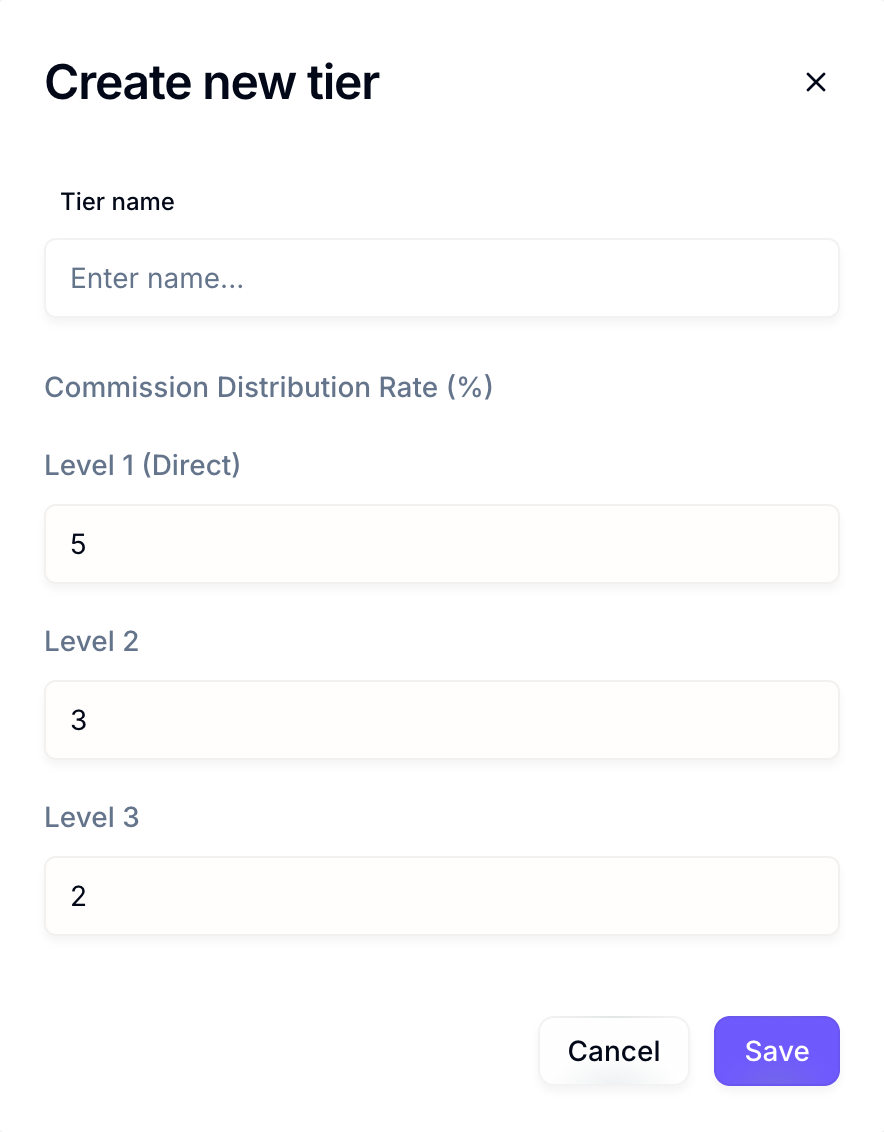
| Step | Action | Details |
|---|---|---|
| 1 | Open dialog | Create new tier dialog appears. |
| 2 | Tier name | Enter a unique name in Tier name. |
| 3 | Commission Distribution Rate (%) | Set Level 1 (Direct), Level 2, and Level 3 with the spinbuttons (defaults e.g. 5, 3, 2). |
| 4 | Save or cancel | Save to create; Cancel to close without saving. |
Tier creation fields
| Field | Description | Default (example) |
|---|---|---|
| Tier name | Unique name for the tier (e.g. "KOL", "Default", "Premium"). | (empty) |
| Level 1 (Direct) | Commission % for direct referrals. | 5 |
| Level 2 | Commission % for second-level referrals. | 3 |
| Level 3 | Commission % for third-level referrals. | 2 |
Edit tier dialog
| Step | Action | Details |
|---|---|---|
| 1 | Open dialog | Click Edit in a tier row; Edit tier dialog opens. |
| 2 | Name | Name is read-only (disabled); tier name cannot be changed here. |
| 3 | Commission Distribution Rate (%) | Edit Level 1 (Direct), Level 2, Level 3 with the spinbuttons. |
| 4 | Referrer count | Dialog shows "Referrer in this tier: N" (e.g. 68). |
| 5 | Save or cancel | Save to apply; Cancel to close without saving. |
Tier editing
| Step | Action | Details |
|---|---|---|
| 1 | Find tier | Locate the tier in the Tier management table. |
| 2 | Edit | Click Edit in that row. |
| 3 | Change settings | Update Level 1, 2, 3 rates (name is read-only in Edit). |
| 4 | Save or cancel | Save to apply; Cancel to discard. |
Example tiers
| Tier name | Level 1 | Level 2 | Level 3 | Description |
|---|---|---|---|---|
| KOL | 30% | 10% | 10% | For Key Opinion Leaders / influencers. |
| Default | 5% | 3% | 2% (or as configured) | Standard tier for regular users. |
2. User network tab
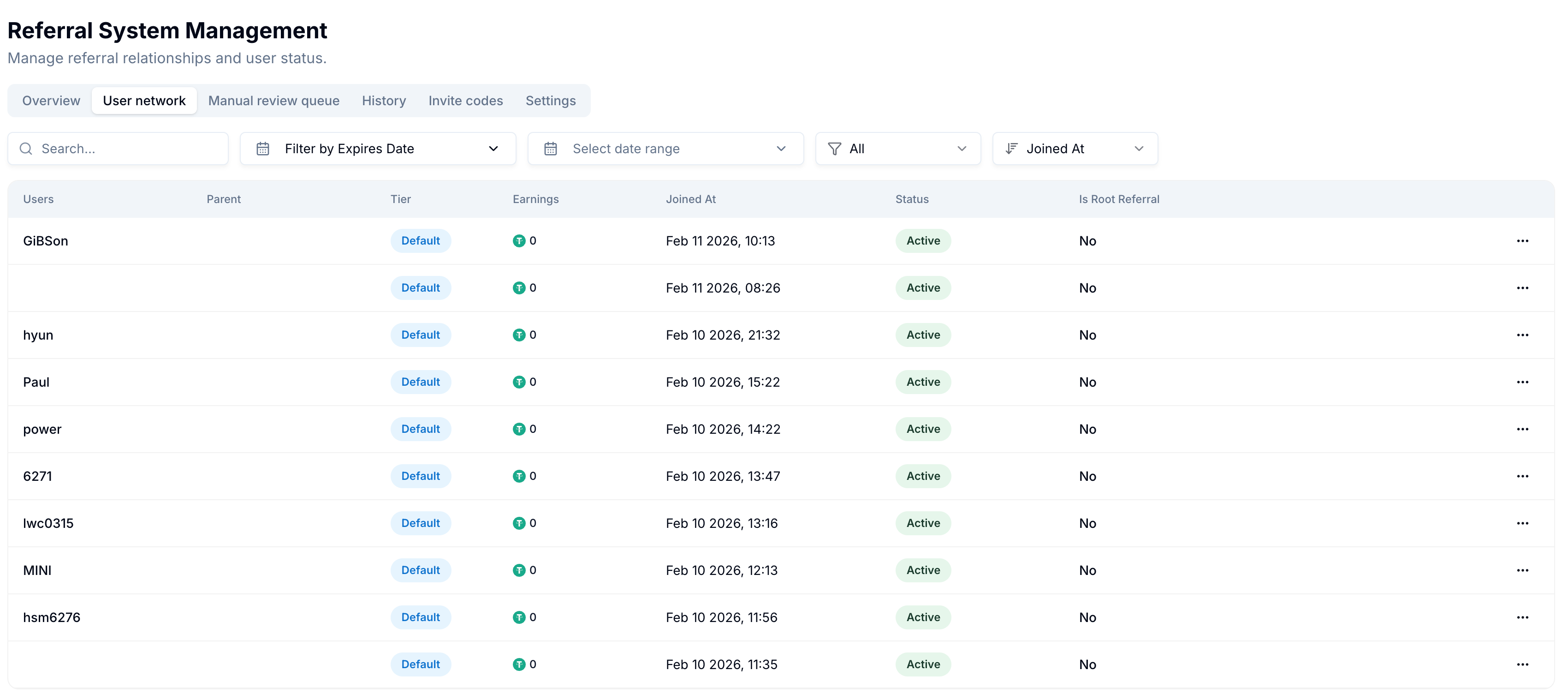
Viewing the user network
| Step | Action | Details |
|---|---|---|
| 1 | Open tab | Select the User network tab. |
| 2 | View table | Table lists users with referral info (see column list below). |
| 3 | Search | Use Search... to filter by username (real-time). Example: type "94999" to show only that user, then use More actions  → View detail to open Referral Details. → View detail to open Referral Details. |
| 4 | Filter by date | Use Select date range to filter by join date. |
| 5 | Filter by expiry (if shown) | Use Filter by Expires Date when available. |
| 6 | Status filter | First dropdown: All, Active, Suspended, etc. |
| 7 | Sort | Second dropdown: e.g. Joined At or other criteria. |
User network table columns
| Column | Description |
|---|---|
| Users | Username of the user in the referral system (may be empty for some rows). |
| Parent | Username of the referrer who invited this user (empty if none). |
| Tier | Commission tier (e.g. Default, KOL). |
| Earnings | Total commission earnings (e.g. "token 0"). |
| Joined At | When the user joined (e.g. "Feb 11 2026, 10:13"). |
| Status | e.g. Active, Suspended. |
| Is Root Referral | Whether this user is a root referrer (e.g. "No"). |
| Actions | Three-dot action menu with Edit and View detail options. |
Editing a user
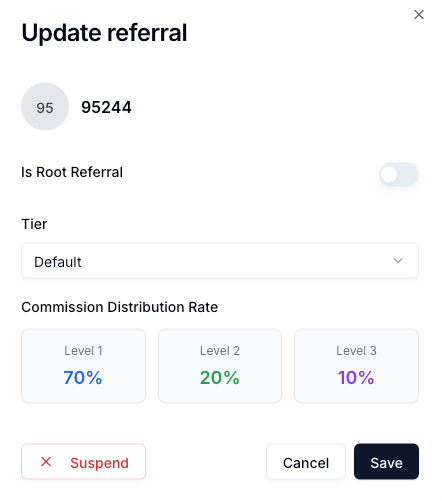
| Step | Action | Details |
|---|---|---|
| 1 | Find user | Locate the user in the User network table. |
| 2 | Open action menu | Click the three-dot action icon in the Actions column. |
| 3 | Edit | Choose Edit from the menu. |
| 4 | Update referral dialog | Dialog shows avatar, username, Is Root Referral switch, tier, and commission distribution. |
| 5 | Set Is Root Referral (optional) | Toggle Is Root Referral on or off. |
| 6 | Change tier | Use the Tier dropdown to assign another tier. |
| 7 | Suspend (optional) | Use Suspend to disable referral privileges. |
| 8 | Save or close | Save to apply; Cancel or Close to exit. |
Update referral dialog (Edit user)
The Update referral dialog shows:
- Avatar / username: Read-only (e.g. "GI", "GiBSon").
- Is Root Referral: Toggle (switch); use it to set or clear root referral status.
- Tier: Dropdown to assign a different commission tier.
- Commission Distribution Rate: Level 1, Level 2, Level 3 % (read-only, from selected tier).
- Suspend: Button to suspend the user's referral privileges.
- Cancel: Discard changes and close.
- Save: Apply changes.
- Close: Close without saving (same as Cancel when unchanged).
User edit dialog fields
| Field | Description | Editable |
|---|---|---|
| User avatar | Short label/avatar for the user (e.g. "GI"). | No |
| Username | Full username. | No |
| Is Root Referral | Switch to mark user as root referrer or not. | Yes |
| Tier | Commission tier dropdown. | Yes |
| Commission Distribution Rate | Level 1, 2, 3 % (from selected tier). | No (updates with tier) |
Viewing a user's referral details
| Step | Action | Details |
|---|---|---|
| 1 | Find user | Locate the user in the User network table (use Search... to filter by username, e.g. "94999"). |
| 2 | Open action menu | Click the three-dot action icon in the Actions column. |
| 3 | View detail | Choose View detail from the menu. |
| 4 | Referral Details modal | A modal opens titled Referral Details with a referral ID (e.g. e2867300-59d3-47e1-afee-f449cf51b298). |
| 5 | Switch tabs | Use Network Hierarchy, Network List, or Reward History to see different views. |
| 6 | Close modal | Click X (close) to exit the modal. |
Referral Details modal
The Referral Details modal shows detailed referral and reward data for the selected user.
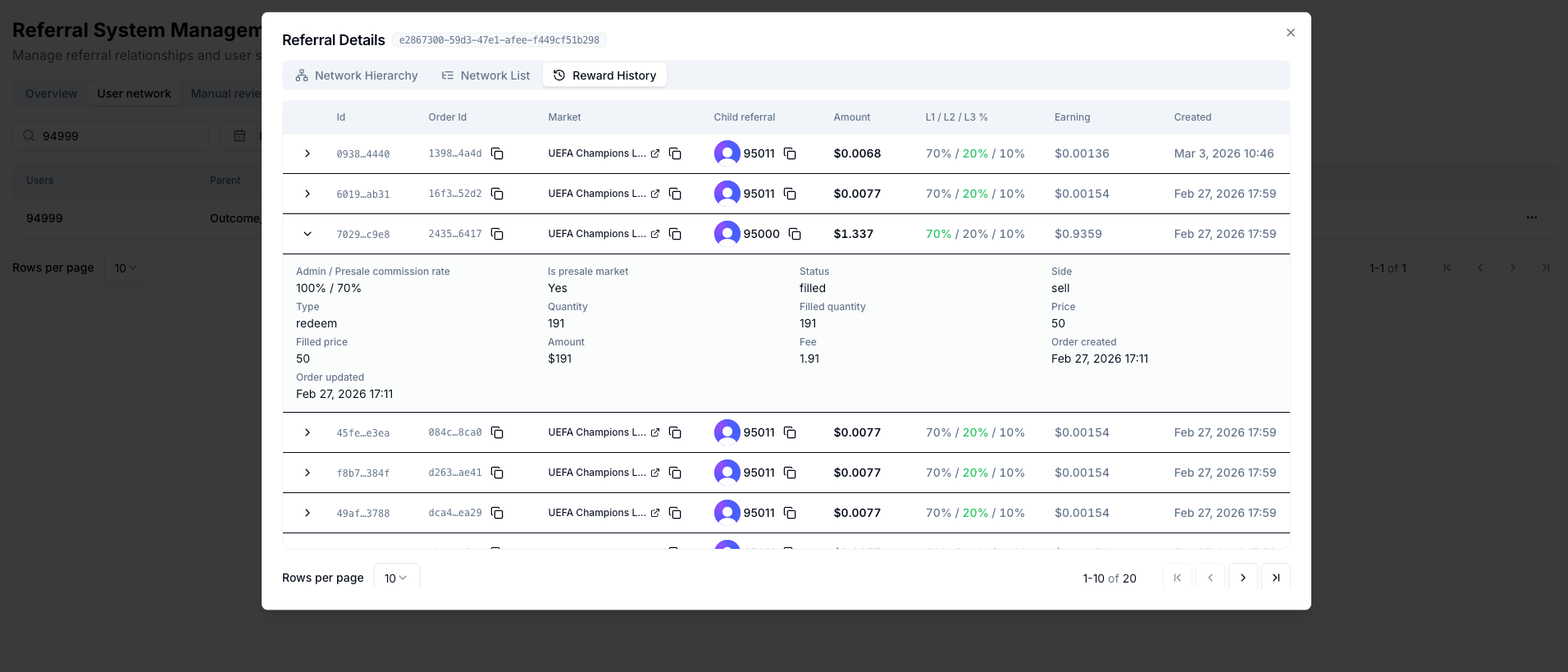
Modal title: "Referral Details" followed by a unique referral ID (e.g. e2867300-59d3-47e1-afee-f449cf51b298).
Tabs:
-
Network Hierarchy (default): Table of referral-related orders and earnings
- Table columns: Id, Order Id, Market, Child referral, Amount, L1 / L2 / L3 %, Earning, Created.
- Rows are expandable; expand a row to see full order/referral details.
- Expanded row details may include: Admin / Presale commission rate, Type, Filled price, Order updated, Is presale market, Quantity, Amount, Status, Filled quantity, Fee, Side, Price, Order created.
- Order Id and Market may have copy or external-link icons.
-
Network List: List view of the referral network (hierarchical or flat list of referred users).
-
Reward History: History of rewards/earnings for this referral.
Information displayed (Network Hierarchy tab):
| Column / field | Description |
|---|---|
| Id | Short identifier for the record (e.g. 0938...4440). |
| Order Id | Order identifier (with copy icon). |
| Market | Market name (e.g. "UEFA Champions L...") with optional link/copy. |
| Child referral | Referred user (e.g. avatar with username 95011, copy icon). |
| Amount | Transaction amount (e.g. "$0.0068", "$1.337"). |
| L1 / L2 / L3 % | Commission split for levels 1–3 (e.g. "70% / 20% / 10%"). |
| Earning | Earned amount (e.g. "$0.00136"). |
| Created | When the record was created (e.g. "Mar 3, 2026 10:46"). |
| Admin / Presale commission rate | Shown in expanded row (e.g. "100% / 70%"). |
| Type | Order type (e.g. "limit"). |
| Status | Order status (e.g. "cancelled"). |
Actions:
- Close (X): Close the modal and return to the User network table.
Referral network dialog (alternative view)
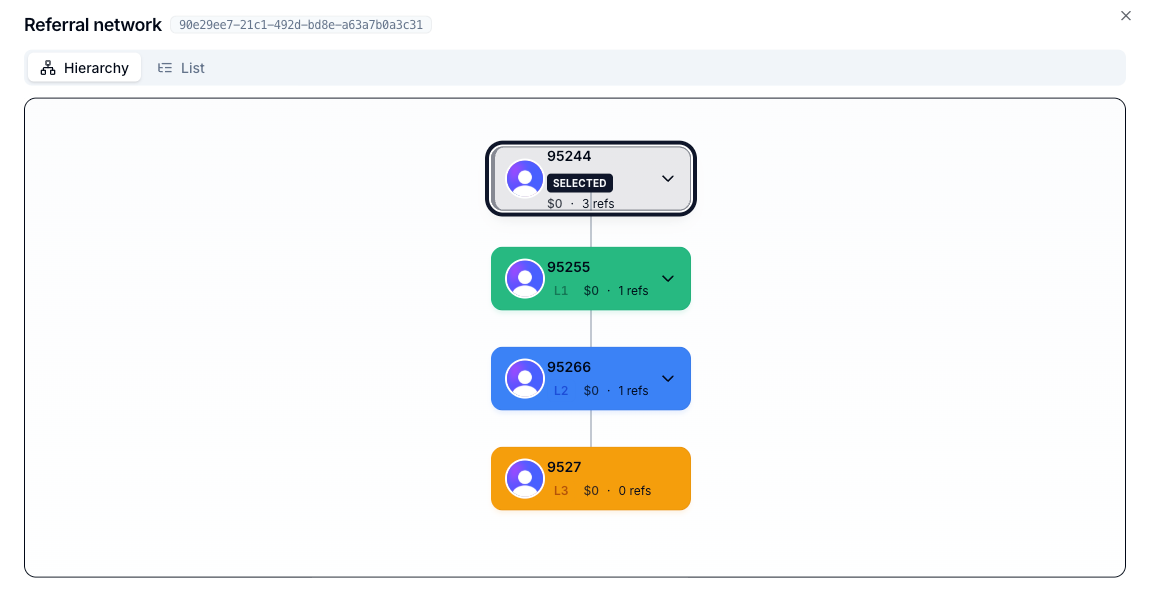
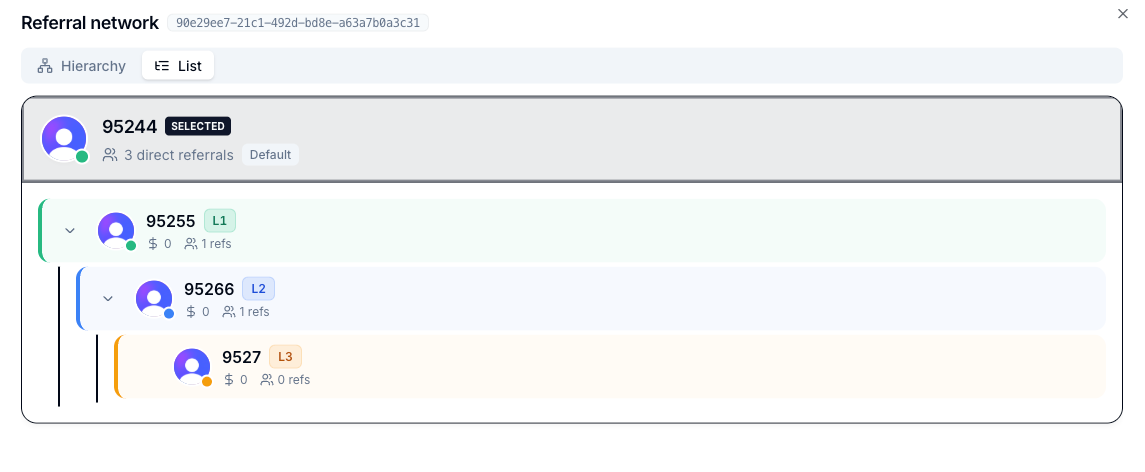
In some flows, a Referral network dialog may show a user's referral hierarchy in a different format:
Dialog Title: "Referral network [user-id]" (e.g. "Referral network 4f30e711-efa7-4026-98cf-aa7fd356755c")
Tabs:
- Hierarchy (default): Visual tree view showing the referral network structure — user avatars, usernames, levels (L1, L2, L3), earnings, and referral counts.
- List: Hierarchical list view with expand/collapse; direct referrals count and level indicators.
3. Manual review queue tab
Viewing the queue
| Step | Action | Details |
|---|---|---|
| 1 | Open tab | Select Manual review queue (or click Review Pending Claims on Overview). |
| 2 | View table | Table shows claims that need manual approval (e.g. at/above auto-approval limit). |
| 3 | Search | Search... filters by username. |
| 4 | Filters | Filter by Expires Date and Select date range filter by date. |
| 5 | Status filter | First dropdown: All, Pending, Approved, Rejected, etc. |
| 6 | Sort | Second dropdown: e.g. Created At or other criteria. |
Manual review queue table columns
| Column | Description |
|---|---|
| Users | Username of the user who submitted the claim. |
| Amount | Requested amount (with currency/token). |
| Created At | When the claim was created. |
| Status | Pending, Approved, Rejected, etc. |
| Actions | Approve, Reject, or view details. |
Reviewing a claim
| Step | Action | Details |
|---|---|---|
| 1 | Locate claim | Find the claim in the Manual review queue table. |
| 2 | Check details | Verify username, amount, and creation date. |
| 3 | Verify eligibility | Confirm the user and claim meet payout rules. |
| 4 | Decide | Click Approve to process or Reject to deny. |
| 5 | Rejection reason | If rejecting, provide a clear reason. |
4. History tab
Viewing commission history
| Step | Action | Details |
|---|---|---|
| 1 | Open tab | Select History. |
| 2 | View table | Table shows processed commission payments (paid/rejected). |
| 3 | Search | Search... filters by username. |
| 4 | Date filter | Select date range and (if shown) Filter by Expires Date by creation date. |
| 5 | Status filter | First dropdown: All, Paid, Rejected, etc. |
| 6 | Sort | Second dropdown: e.g. Created At. |
History table columns
| Column | Description |
|---|---|
| Users | Username of the user who received or was denied the commission. |
| Amount | Amount paid or requested (with currency/token). |
| Created At | When the payment/claim was created. |
| Status | Paid, Rejected, etc. |
| Rejected Reason | Reason if the claim was rejected. |
| Tx Hash | Short link (e.g. "79b7e") to blockchain details. |
| Logs | Button to open transaction/logs details. |
| Actions | Any extra actions for the record. |
Verifying a transaction
| Step | Action | Details |
|---|---|---|
| 1 | Find record | Locate the paid commission in the History table. |
| 2 | Tx Hash | Click the Tx Hash link to open the blockchain explorer. |
| 3 | Logs | Click See logs for processing details. |
5. Invite codes tab
Purpose
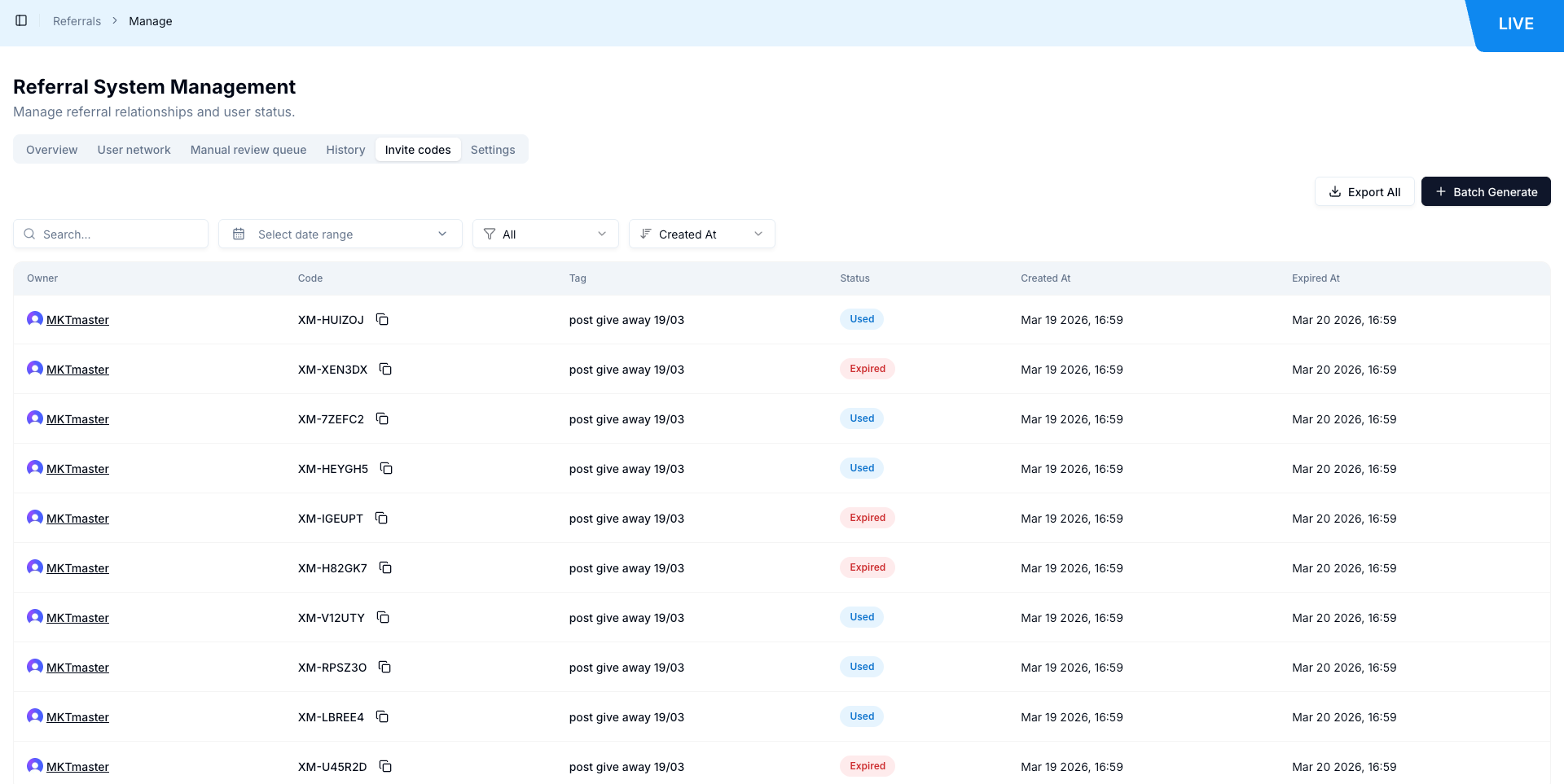
Manage invite codes: view owners, codes, tags, status, and expiry. Export or batch-generate codes.
Viewing invite codes
| Step | Action | Details |
|---|---|---|
| 1 | Open tab | Select Invite codes. |
| 2 | View table | Table lists invite codes with Owner, Code, Tag, Status, Created At, Expired At. |
| 3 | Export | Click Export All to export invite code data. |
| 4 | Batch generate | Batch Generate opens the Batch Generate Invite Codes dialog. |
| 5 | Search | Search... to filter (e.g. by owner or code). |
| 6 | Date filter | Select date range to filter by creation/expiry. |
| 7 | Status / sort | First dropdown starts at All; second sorting dropdown includes Created At. |
Batch Generate Invite Codes
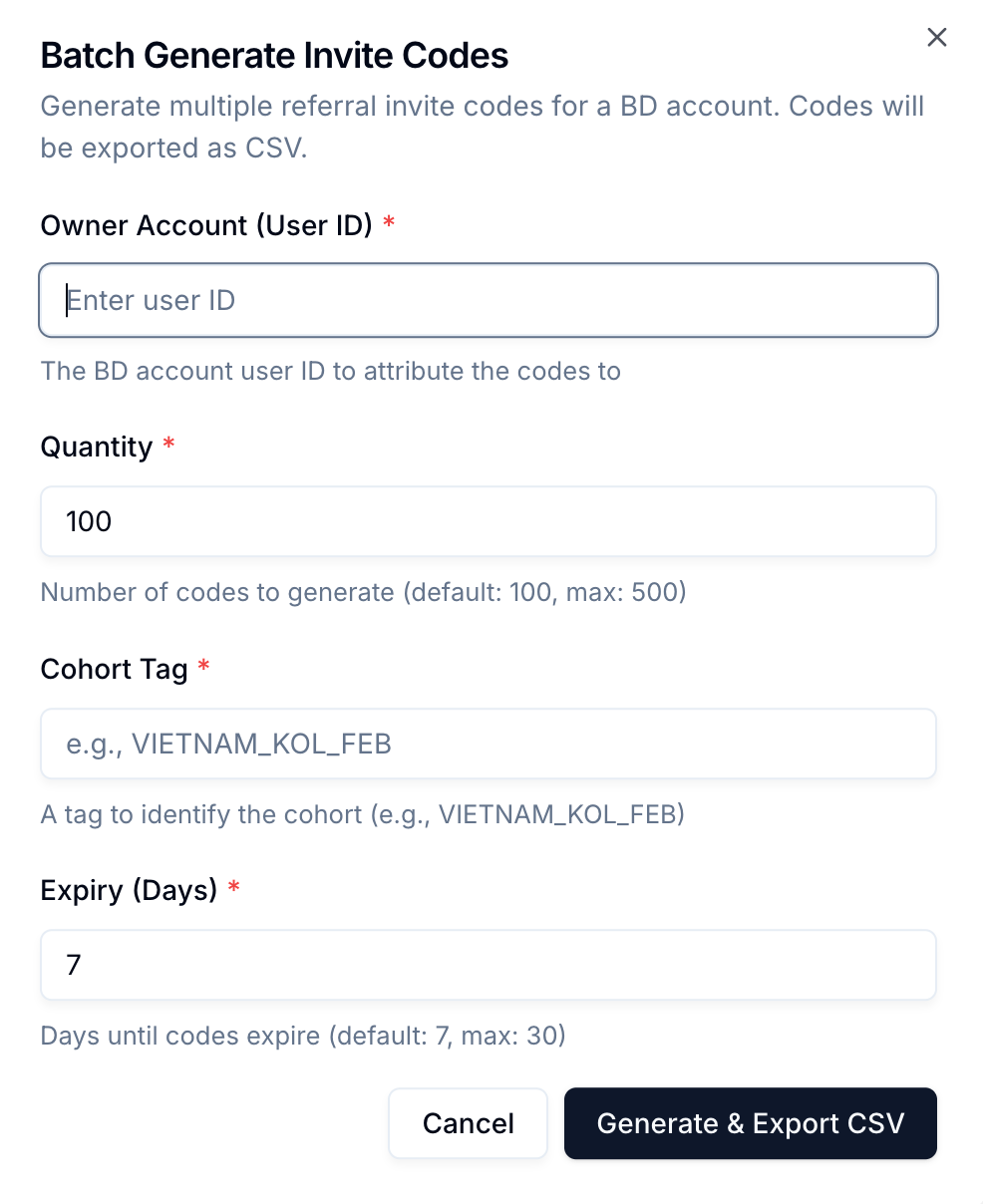
| Step | Action | Details |
|---|---|---|
| 1 | Open dialog | Click Batch Generate on the Invite codes tab. |
| 2 | Dialog title | Batch Generate Invite Codes — "Generate multiple referral invite codes for a BD account. Codes will be exported as CSV." |
| 3 | Owner Account (User ID)* | Textbox: the BD account user ID to attribute the codes to. |
| 4 | Quantity* | Spinbutton: number of codes to generate (default 100, max 500). |
| 5 | Cohort Tag* | Textbox: tag to identify the cohort (e.g. VIETNAM_KOL_FEB). |
| 6 | Expiry (Days)* | Spinbutton: days until codes expire (default 7, max 30). |
| 7 | Actions | Generate & Export CSV to create and download; Cancel or Close to exit. |
Validation observed during testing:
- User ID is required
- Cohort tag is required
Invite codes table columns
| Column | Description |
|---|---|
| Owner | User who owns the code: avatar + link to user profile (e.g. MKTtest2 → /admin/users/{userId}). |
| Code | Invite code (e.g. "XM-QA6FJS"); each row includes a copy-to-clipboard action. |
| Tag | Cohort/tag label (e.g. "KOL_1"). |
| Status | Includes values such as Active, Used, and Expired. |
| Created At | When the code was created (e.g. "Feb 06 2026, 10:09"). |
| Expired At | Expiry date/time. |
6. Settings tab
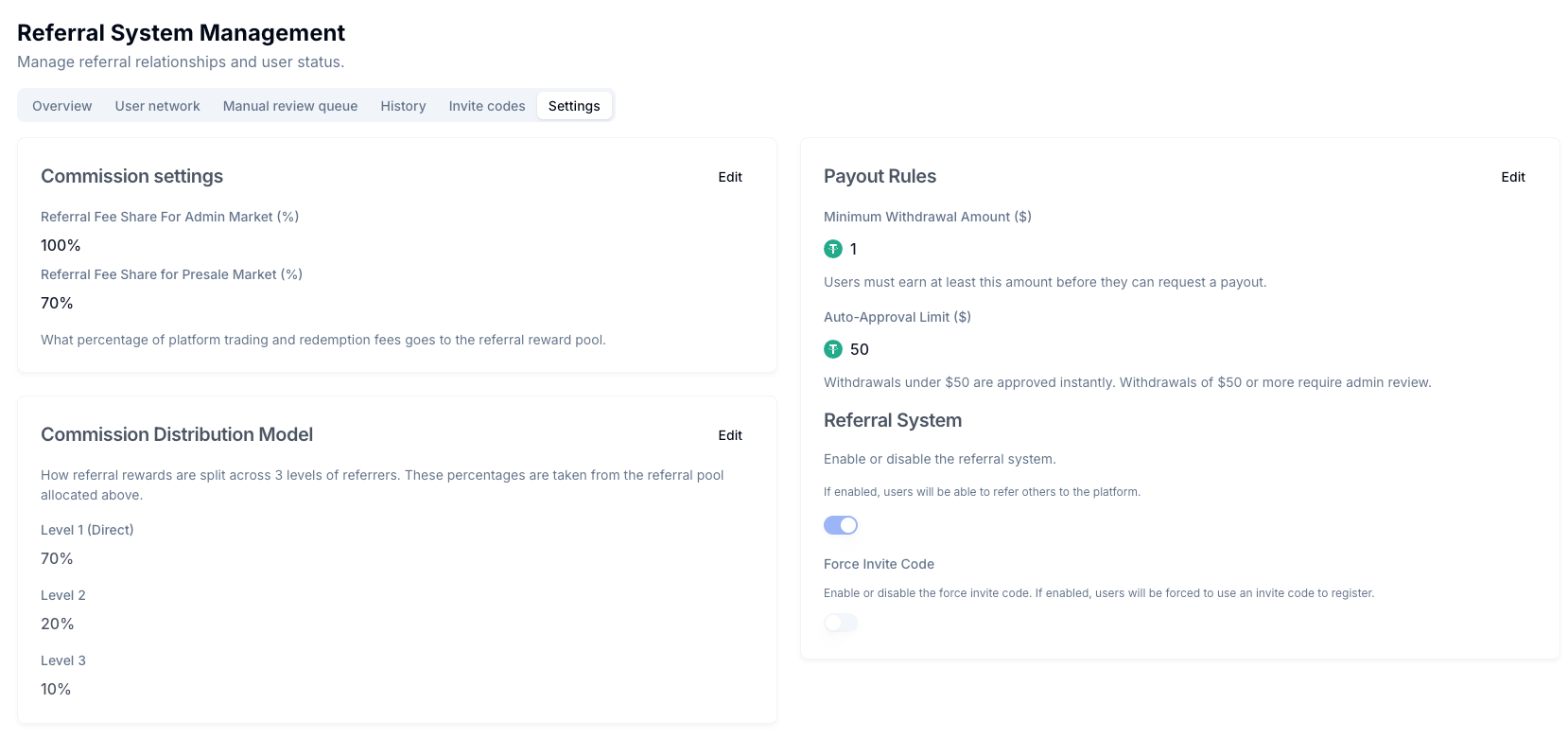
Commission settings
| Step | Action | Details |
|---|---|---|
| 1 | Open tab | Select Settings. |
| 2 | Commission settings | Referral Fee Share For Admin Market (%) (e.g. 100%) and Referral Fee Share for Presale Market (%) (e.g. 70%) — percentage of platform trading and redemption fees that goes to the referral reward pool for each market type. Click Edit to change. |
| 3 | Commission Distribution Model | Level 1 (Direct), Level 2, Level 3 percentages (e.g. 70%, 20%, 10%). These percentages are taken from the referral pool allocated above. Click Edit to change. |
| 4 | Payout Rules | Minimum Withdrawal Amount (e.g. 1 in platform token/$) and Auto-Approval Limit (e.g. 2) — withdrawals below the auto-approval limit are approved instantly; at or above require admin review. Click Edit to change. |
| 5 | Referral System | Toggle to enable/disable the referral system. If enabled, users will be able to refer others to the platform. (May be locked/disabled in some environments.) |
| 6 | Force Invite Code | Toggle: when enabled, users will be forced to use an invite code to register. (May be locked/disabled in some environments.) |
Editing Commission settings
| Step | Action | Details |
|---|---|---|
| 1 | Find section | In Settings, locate Commission settings section. |
| 2 | Edit | Click Edit; the section switches to inline edit (no modal). |
| 3 | Set fee shares | Update Referral Fee Share For Admin Market (%) and Referral Fee Share for Presale Market (%) using spinbuttons. |
| 4 | Save | Click Save changes to apply. (No Cancel — revert by editing again.) |
Editing Commission Distribution Model
| Step | Action | Details |
|---|---|---|
| 1 | Find section | In Settings, locate Commission Distribution Model (description: how rewards are split across 3 levels of referrers. These percentages are taken from the referral pool allocated above). |
| 2 | Edit | Click Edit; the section switches to inline edit (no modal). |
| 3 | Set levels | Level 1 (Direct), Level 2, Level 3 appear as spinbuttons with % (e.g. 70%, 20%, 10%). Update as needed (e.g. ensure total is as required). |
| 4 | Save | Click Save changes to apply. (No Cancel — revert by editing again.) |
Editing Payout Rules
| Step | Action | Details |
|---|---|---|
| 1 | Find section | In Settings, locate Payout Rules. |
| 2 | Edit | Click Edit; the section switches to inline edit (no modal). |
| 3 | Minimum Withdrawal Amount ($) | Spinbutton with token/$ (e.g. 1). Description: users must earn at least this amount before they can request a payout. |
| 4 | Auto-Approval Limit ($) | Spinbutton (e.g. 2). Description: withdrawals under this amount are approved instantly; at or above require admin review. |
| 5 | Save | Click Save changes to apply. |
Settings reference
| Setting | Example / note | Description |
|---|---|---|
| Referral Fee Share For Admin Market (%) | 100% | Percentage of admin market trading and redemption fees going to the referral reward pool. |
| Referral Fee Share for Presale Market (%) | 70% | Percentage of presale market trading and redemption fees going to the referral reward pool. |
| Level 1 (Direct) | 70% | Default split for direct referrals from the referral pool. |
| Level 2 | 20% | Second-level referrals from the referral pool. |
| Level 3 | 10% | Third-level referrals from the referral pool. |
| Minimum Withdrawal Amount | 1 (token/$) | Minimum earnings before a user can request payout. |
| Auto-Approval Limit | 2 (token/$) | Below this amount, claims are auto-approved instantly; at or above, manual review required. |
| Referral System | Enabled (toggle) | Master switch for the referral system. If enabled, users will be able to refer others to the platform. May be disabled (locked) in some environments. |
| Force Invite Code | On/Off (toggle) | If on, users will be forced to use an invite code to register. May be disabled (locked) in some environments. |
7. Search and filters
Search
| Tab | Search purpose | Behavior |
|---|---|---|
| User network | By username | Real-time filter as you type. |
| Manual review queue | By username | Real-time filter. |
| History | By username | Real-time filter. |
| Invite codes | By owner/code etc. | Real-time filter. |
| Overview (Tier management) | By tier name | Real-time filter. |
Date and other filters
- Select date range: Used on User network, Manual review queue, History, and Invite codes to filter by date (e.g. join date, created date, expiry).
- Filter by Expires Date: On User network (and optionally elsewhere) when available.
- Status dropdown: First dropdown on each tab (All, Active, Suspended, Pending, Paid, Rejected, etc.).
- Sort dropdown: Second dropdown (Joined At, Created At, Amount, Earnings, etc.).
Product Glossary
| Term | Description |
|---|---|
| Auto-Approval Limit | Withdrawals below this amount (in platform token/$) are approved instantly; at or above this amount require admin review in the Manual review queue. |
| Batch Generate Invite Codes | Dialog to generate multiple invite codes at once for a BD account, with owner, quantity, cohort tag, and expiry; codes can be exported as CSV. |
| Commission Distribution Model | Settings that define how referral rewards are split across Level 1 (Direct), Level 2, and Level 3 referrers (e.g. 70%, 20%, 10%). Percentages apply to the referral pool. |
| Commission Distribution Rate | Per-tier percentages for Level 1 (Direct), Level 2, and Level 3 commissions (e.g. L1: 7%, L2: 2%, L3: 1%). Shown in tier table and Edit tier dialog. |
| Cohort Tag | Tag used when batch-generating invite codes to identify the cohort (e.g. VIETNAM_KOL_FEB). |
| Earnings | Total commission earnings for a user in the referral system (e.g. "token 0"), shown in User network and referral network views. |
| Force Invite Code | Settings toggle: when enabled, users must use an invite code to register. May be locked in some environments. |
| History tab | Tab showing processed commission payments (paid or rejected), with Users, Amount, Created At, Status, Rejected Reason, Tx Hash, and Logs. |
| Invite code | Code (e.g. XM-QA6FJS) that users can share so others can register with them as referrer. Has Owner, Tag, Status (Active/Used), and Expired At. |
| Is Root Referral | Switch in the Update referral dialog indicating whether the user is a root referrer. Editable per user. |
| Level 1 (Direct) | Commission for direct referrals (users invited directly by the referrer). |
| Level 2 | Commission for second-level referrals (users invited by someone the referrer invited). |
| Level 3 | Commission for third-level referrals (one level further down the referral chain). |
| Manual review queue | Tab listing commission claims that need manual admin approval (e.g. at or above the Auto-Approval Limit). Admins can Approve or Reject. |
| Minimum Withdrawal Amount | Minimum earnings (in platform token/$) a user must have before requesting a payout. |
| Overview tab | Main tab with pending claims count, total commissions paid, active referrers, Review Pending Claims action, and Tier management section. |
| Parent | Username of the referrer who invited a user (shown in User network table); empty if the user has no referrer. |
| Payout Rules | Settings section for Minimum Withdrawal Amount and Auto-Approval Limit. Defines when users can request payout and when claims need manual review. |
| Referral Fee Share For Admin Market (%) | Percentage of admin market trading and redemption fees that goes to the referral reward pool. |
| Referral Fee Share for Presale Market (%) | Percentage of presale market trading and redemption fees that goes to the referral reward pool. |
| Referral Details modal | Modal opened via View detail from the User network More actions menu. Shows referral ID and tabs: Network Hierarchy (table of orders/earnings with expandable rows), Network List, and Reward History. |
| Referral network dialog | Alternative dialog showing a user's referral hierarchy (Hierarchy tab) or list (List tab), with levels (L1, L2, L3), earnings, and referral counts. |
| Referral System | Feature that rewards users for inviting others; includes tiers, commission distribution, invite codes, and payouts. Can be enabled/disabled in Settings. |
| Referral System Management | Back-office area for managing the referral program: Overview, User network, Manual review queue, History, Invite codes, and Settings. |
| Suspend | Action in the Update referral dialog to disable a user's referral privileges. |
| Tier | Commission tier (e.g. Default, KOL) with a name and Commission Distribution Rate (Level 1, 2, 3). Users are assigned a tier; tiers are managed in Overview. |
| Tier management | Section on the Overview tab to create, edit, and search tiers (Name, Commission Distribution Rate, Edit button). |
| Total Active Referrers | Count of users currently earning referral commissions, shown on the Overview tab. |
| Total commissions Paid | Cumulative amount paid to referrers, shown on the Overview tab. |
| Tx Hash | Transaction hash for a paid commission; link in the History table to the blockchain explorer. |
| Update referral dialog | Dialog opened via Edit from the User network More actions menu; used to edit Is Root Referral, Tier, and Suspend status. |
| User network tab | Tab listing users in the referral system with columns: Users, Parent, Tier, Earnings, Joined At, Status, Is Root Referral, Actions (Edit, View detail). Use Search to filter by username (e.g. 94999). |
| View detail | Action in the User network row More actions menu that opens the Referral Details modal for that user (referral ID, Network Hierarchy, Network List, Reward History). |