Transaction History
Overview
This page helps operators review transaction records in the backoffice. You can search, filter, and export data. The page is used for monitoring and verification tasks.
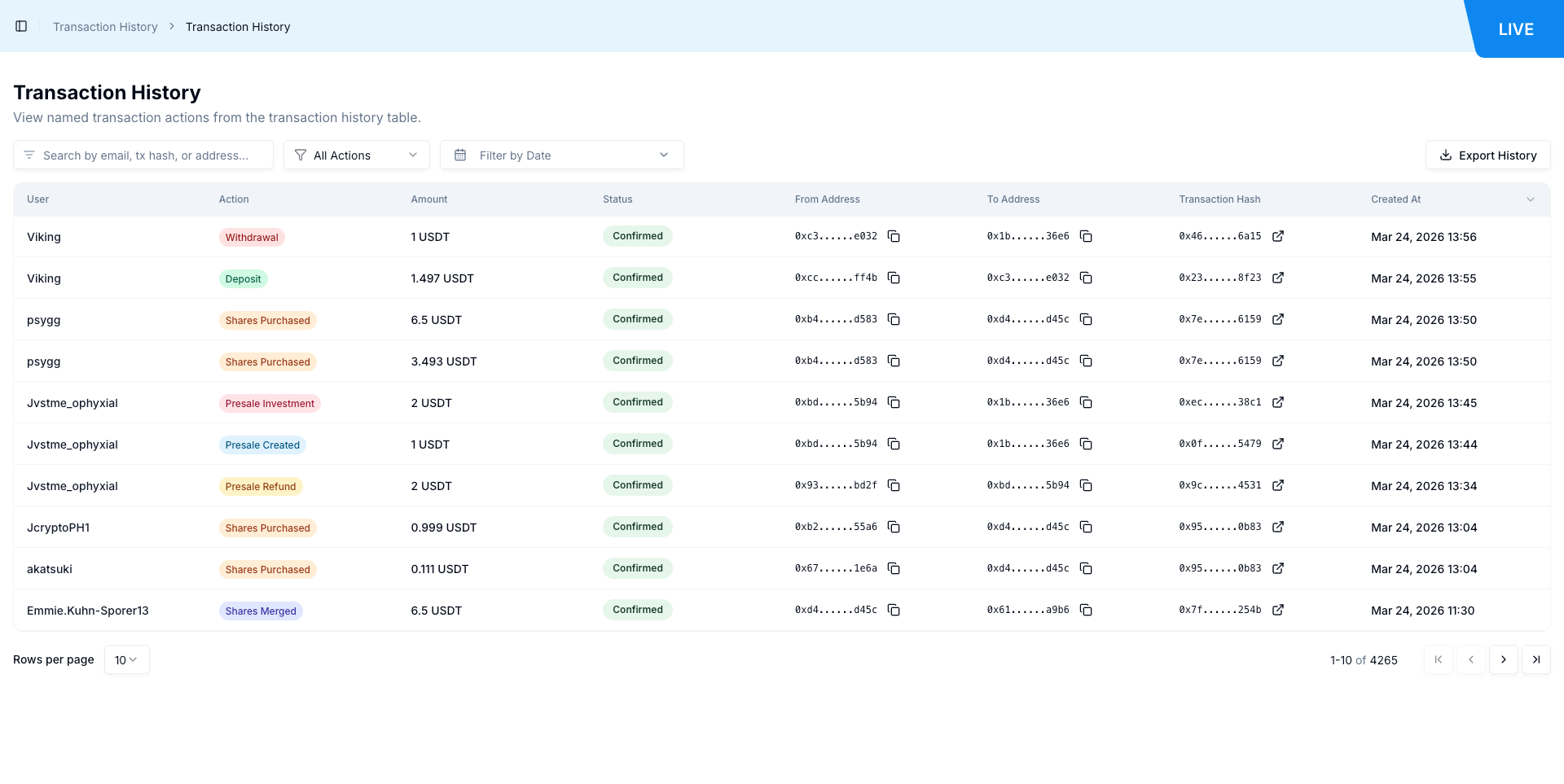
Configuration Table
| Field | Description | Example |
|---|---|---|
| Search by email, tx hash, or address | Text search for transaction rows | 0x |
| All Actions | Filter transactions by action type | Deposit |
| Filter by Date | Choose a date range for the table | Select start and end dates |
| Export History | Download a CSV file from current table view | transaction_history_all_2026-03-24.csv |
| User | Link to user profile | /profile/Shyanne91 |
| Action | Transaction action label | Shares Sold, Shares Purchased, Deposit |
| Amount | Transaction amount with token/network label | 4.99 BETA USDT |
| Status | Current transaction status | Confirmed |
| From Address | Source wallet address (short format) | 0xea......29e9 |
| To Address | Destination wallet address (short format) | 0x40......1911 |
| Transaction Hash | Linked on-chain hash (short format) | 0xac......b16b |
| Created At | Transaction timestamp | Mar 24, 2026 13:57 |
Step-by-Step Operation
| Step | Action | Details |
|---|---|---|
| 1 | Open Transaction History | Open Transaction History from the backoffice menu. |
| 2 | Review transaction table | Review the table to see recent transaction records. |
| 3 | Search transactions | Use the search box to find rows by email, hash, or address. |
| 4 | Filter by action | Click All Actions and choose an action filter when needed. |
| 5 | Filter by date | Click Filter by Date and select a date range. |
| 6 | Open user profile | Click a username in the User column to open that profile. |
| 7 | Open transaction on explorer | Click a value in Transaction Hash to open the block explorer. |
| 8 | Export history | Click Export History to download a CSV file. |
System Behavior
| Action | Result |
|---|---|
| Open Transaction History page | Table loads with transaction rows |
| Enter a search value with no matches | Table shows No data |
Select Deposit from All Actions | Table rows switch to Deposit actions |
| Select a date range | Table results update based on selected dates |
| Click a username | Opens the user profile page |
| Click a transaction hash | Opens an external block explorer transaction URL |
| Click Export History | Browser downloads a CSV file |
Operational Notes
- The page behaves as a read-focused operations screen.
- Action values seen during testing include
Shares Sold,Shares Purchased, andDeposit. - Transaction hash links can open external explorers such as BscScan.
- If a search value returns no match, the page shows
No data. - Information not available in current source: complete list of every possible action filter value.
Product Glossary
| Term | Description |
|---|---|
| Transaction History | Admin page used to review transaction records. |
| Action | The transaction event type shown in the table (for example Deposit or Shares Sold). |
| Status | Current state of the transaction record, shown in the Status column (for example Confirmed). |
| Transaction Hash | On-chain transaction identifier that links to an external block explorer. |
| From Address | Source wallet address for the transaction, displayed in shortened format. |
| To Address | Destination wallet address for the transaction, displayed in shortened format. |
| Export History | Button that downloads transaction records as a CSV file. |
| No data | Empty-result message shown when filters or search return no matching rows. |